Mastering Information: How to Organize Digital Bookmarks for Peak Productivity
In an era where information is the primary currency, our digital browsers have become the modern-day equivalent of an overflowing filing cabinet. For professionals and students alike, the “Save to Bookmarks” button is a reflex—a way to preserve research, tools, and inspiration for a future that often never comes. However, without a deliberate system, your bookmark bar becomes a graveyard of dead links and forgotten ideas, contributing to digital clutter rather than solving it.
As we move toward 2026, the volume of digital content is only accelerating. Effective bookmark management is no longer just a “neat habit”; it is a vital survival skill for navigating the modern workflow. Whether you are a student compiling sources for a thesis or a professional managing multiple client projects, a streamlined bookmarking strategy reduces cognitive load and ensures that the right information is available at the exact moment you need it. This guide provides a comprehensive blueprint for transforming your digital chaos into a high-performance library.
1. The Audit: Declaring Bookmark Bankruptcy
Before you can build a high-functioning system, you must confront the clutter of the past. Most users have bookmarks dating back years—links to tools that no longer exist, articles that are now outdated, and “read later” items that have lost their relevance.
To start your audit, export your current bookmarks to a HTML file as a backup. This provides a safety net, allowing you to be ruthless in your cleaning. The next step is “Bookmark Bankruptcy.” If a link hasn’t been clicked in twelve months, it likely doesn’t belong in your primary workspace. Use tools like “Check My Links” or “Bookmark Clean Up” (available as browser extensions) to automatically identify and delete broken URLs and duplicates.
For professionals, the audit phase should focus on utility. Ask yourself: *Does this link support a current project or a recurring task?* For students, focus on relevance: *Is this source still credible and necessary for my curriculum?* By clearing the noise, you create the “white space” necessary to implement a 2026-ready organizational framework.
2. Structural Frameworks: Folders vs. Tags
The debate between folder-based and tag-based organization is central to digital management. In 2026, the most effective systems often use a hybrid approach, but understanding the strengths of each is crucial.
#
The Folder Method (Hierarchical)
Folders are excellent for “Context-Switching.” If you are a project manager, you might have top-level folders for different clients. Inside each client folder, sub-folders might include “Contracts,” “Research,” and “Dashboards.” This creates a clear, linear path to information. The downside of folders is that a link can usually only live in one place.
#
The Tagging Method (Associative)
Tags allow for a more fluid discovery of information. A link about “Data Visualization” might be tagged with #Marketing, #Research, and #DesignTools. Tagging is superior for research-heavy workflows where a single resource might apply to multiple areas of study or business.
#
The Hybrid Recommendation: The PARA Method
Originally developed by Tiago Forte, the PARA method (Projects, Areas, Resources, Archives) is a powerhouse for bookmark organization.
* **Projects:** Links for active work with a deadline (e.g., “Q3 Marketing Campaign”).
* **Areas:** Long-term responsibilities (e.g., “Financial Planning” or “Health”).
* **Resources:** General interests or topics you are tracking (e.g., “AI Trends,” “Design Inspiration”).
* **Archives:** Completed projects or inactive interests that you aren’t ready to delete but don’t want to see daily.
3. Advanced Tooling for the 2026 Digital Landscape
While native browser bookmark managers (Chrome, Firefox, Safari) have improved, they often lack the robust features required for high-level professional work. In 2026, dedicated bookmarking apps are the standard for power users.
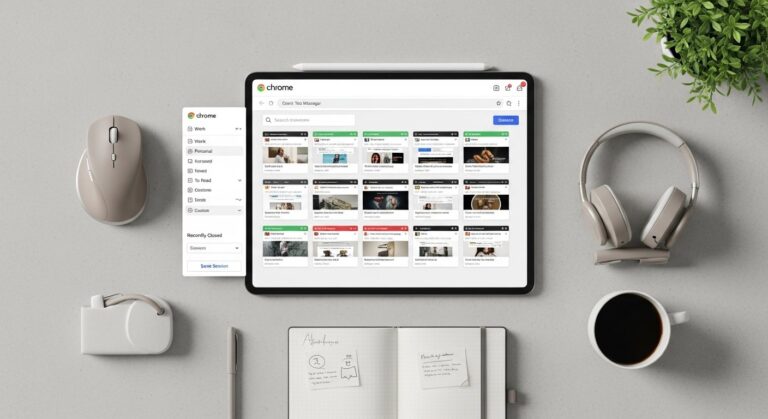
* **Raindrop.io:** This is perhaps the most versatile tool available. It allows for nested folders, tags, and—crucially—a “thumbnail” view that makes visual discovery much faster. It also offers a “permanent library” feature that saves a copy of the webpage content even if the original site goes down.
* **Pocket / Instapaper:** These are “Read-It-Later” apps. The biggest mistake users make is mixing “Resources” (permanent links) with “Reading” (temporary consumption). Use Pocket for articles you want to read once, and keep your browser bookmarks for tools and reference materials you use repeatedly.
* **Notion:** For students and researchers, Notion acts as a “second brain.” By using the Notion Web Clipper, you can turn bookmarks into database entries where you can add notes, dates, and related project links directly to the entry.
* **Browser Tab Groups:** Don’t forget the power of the browser itself. Modern browsers allow you to “Save Tab Groups.” This is ideal for short-term projects where you need five specific tabs open every morning but want them gone by the evening.
4. Naming Conventions and Visual Cues
A bookmark is only useful if you can identify it in three seconds or less. Standard bookmark titles are often long, messy, and filled with SEO keywords that make the bookmark bar unreadable.
#
Use the “Action-First” Naming Convention
Instead of letting a bookmark be named “Google Docs – 2026 Strategic Plan – Version 4,” rename it to “PLAN: Strategic 2026.” Use prefixes to categorize the type of link:
* **[TOOL]** Canva Dashboard
* **[REF]** APA Citation Guide
* **[READ]** The Future of Remote Work
#
The Power of Emojis
Visual cues bypass the need for reading, which speeds up navigation. Use a 📁 for folders, a 🚀 for launch-pad tools, and a 📚 for research. If you have a bookmark bar with 20 icons, removing the text entirely and leaving only the “Favicon” (the site’s small logo) can create a minimalist, hyper-efficient toolbar for your most-used sites (Gmail, Calendar, Slack).
5. Maintenance: The Sunday Reset
Even the best system will succumb to entropy without maintenance. Professionals should treat their digital workspace like a physical desk. A “Sunday Reset” or a “Monthly Audit” is essential to keep the system lean.
During this session:
1. **Empty the “Inbox”:** Many users have a folder named “Unsorted.” Go through it and move links to their permanent PARA folders.
2. **Archive Completed Projects:** If a student finishes a semester, all bookmarks related to those specific classes should be moved to the “Archives” folder. This keeps the active workspace focused.
3. **Review the “Read Later” Queue:** Be honest. If you didn’t read that 50-page whitepaper in the last month, you probably won’t. Delete it.
4. **Sync Check:** Ensure your mobile bookmarks and desktop bookmarks are syncing correctly. There is nothing more frustrating than needing a link on the go and realizing it only exists on your office iMac.
6. Integrating Bookmarks into Your Professional Workflow
Organization shouldn’t be a hobby; it should be a facilitator of work. To maximize the ROI on your bookmarking efforts, integrate them into your daily rituals.
For students, this means creating a “Study Session” bookmark folder. Right-click the folder and select “Open All in New Window” to instantly launch your library database, your citation tool, and your university portal. This eliminates the “friction of starting,” which is the primary cause of procrastination.
For professionals, use bookmarks as a “Dashboard.” Instead of searching through your email for a recurring Zoom link or a specific KPI spreadsheet, pin these to your bookmark bar using a dedicated “DAILY” folder. By 2026, many professionals are also using “Workspaces” (available in browsers like Arc or Edge) to separate personal bookmarks from professional ones entirely. This prevents “context bleeding,” ensuring that when you are at work, you aren’t distracted by your personal travel planning or hobbyist links.
FAQ
**Q1: Is it better to use a third-party app or my browser’s native bookmark manager?**
A: It depends on your volume. If you have fewer than 100 bookmarks, native managers are sufficient. However, for professionals and students handling thousands of links, a third-party tool like Raindrop.io provides better searchability, tagging, and cross-browser syncing that native tools lack.
**Q2: How do I handle “Read Later” items without clogging my system?**
A: Use a dedicated “buffer” app like Pocket or Instapaper. Never put a “Read Later” article in your permanent bookmark folders. Once you’ve read the article, either delete it or, if it’s truly valuable, move it to a “Resources” folder in your primary bookmarking system.
**Q3: My bookmark bar is full. What should I do?**
A: Start by deleting the text for your most recognizable icons (like Gmail or LinkedIn). These “favicon-only” bookmarks take up 90% less space. For everything else, use a “Main Menu” folder that contains sub-folders, keeping your bar clean and focused only on the top 5-10 sites you use hourly.
**Q4: How do I organize bookmarks for a group project?**
A: Avoid sharing individual links via Slack or email. Instead, use a shared Notion page or a “shared collection” in an app like Raindrop.io. This creates a single source of truth that all team members can access and update in real-time.
**Q5: Will organizing my bookmarks really save that much time?**
A: Yes. Studies suggest that the average knowledge worker spends up to 20% of their day looking for information. Reducing the “search time” by even a few minutes per hour compounds into hours of regained productivity every month.
Conclusion: The Path to Digital Clarity
In 2026, the ability to curate and retrieve information is a competitive advantage. Digital bookmarks are not just links; they are the breadcrumbs of your intellectual and professional journey. By auditing your current mess, adopting a framework like PARA, and utilizing modern tools, you transform your browser from a source of anxiety into a powerful engine for productivity.
The key to success is consistency. Start small: spend fifteen minutes today cleaning your bookmark bar and creating your first three folders. As you feel the relief of a clutter-free workspace, the habit will sustain itself. Remember, a well-organized digital library doesn’t just store information—it liberates your mind to focus on the work that actually matters.